Clean IPs vs Flagged IPs: What You Need to Know

Executive Summary: IP Address Reputation & Hygiene Standards
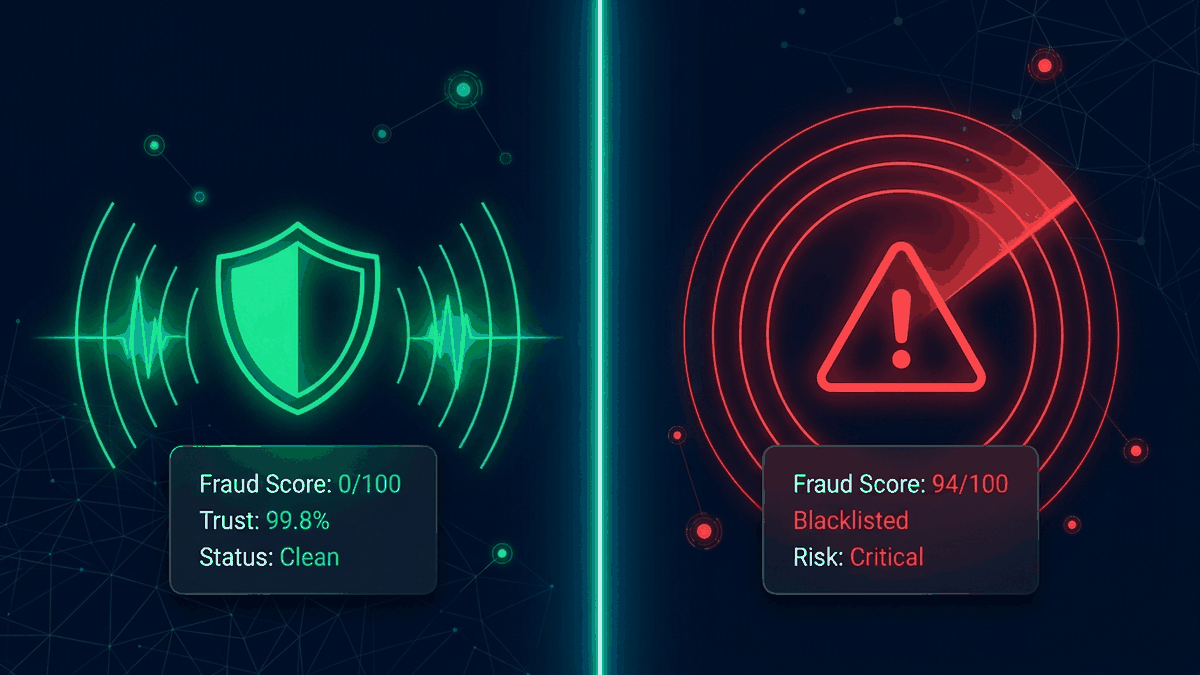
In contemporary network engineering, automated data collection, cybersecurity defense, and e-commerce infrastructure, an IP address is no longer an anonymous transmission identifier. Modern anti-bot firewalls (such as Cloudflare Bot Management, Akamai Bot Manager, Datadome, AWS WAF, and F5 Shape) and fraud intelligence networks (such as MaxMind minFraud, IPQualityScore, Scamalytics, and Spamhaus) continuously evaluate every inbound packet against a dynamic multi-tiered trust framework. A Clean IP address possesses verifiable ISP Autonomous System Number (ASN) alignment, pristine historical abuse logs, forward-confirmed reverse DNS (FCrDNS), and consistent Layer 3 through Layer 7 protocol fingerprints. In contrast, a Flagged IP address exhibits behavioral anomalies, blacklisting on DNS-based blackhole lists (DNSBLs), subnet contamination, or high fraud probability scores, resulting in immediate connection drops, HTTP 403 Forbidden statuses, and aggressive CAPTCHA challenges.
99.4%
Zero Friction / Fast Path
88.2%
403 / Managed Challenge
Fraud Score < 15
Enterprise Allowlist Band
7–30 Days
Natural Decay Period
1. The Anatomy of an IP Reputation Score: Defining Clean vs. Flagged
Understanding the operational mechanics of automated web harvesting, account orchestration, and competitive market intelligence requires deconstructing how edge security nodes classify incoming IP addresses. An IP address does not carry a binary label burned into its silicon; rather, it is assigned a rolling, probabilistic reputation score calculated in real time by edge compute workers. When an HTTP client establishes a TCP three-way handshake with a target server, security algorithms query both local threat caches and global distributed intelligence feeds to answer a fundamental question: What is the statistical likelihood that this connection originates from an abusive automated script rather than a genuine human user?
A Clean IP address is one that registers negligible abuse history, belongs to a genuine residential proxy network (powered by consumer ISPs such as Comcast, AT&T, Verizon, or Deutsche Telekom), possesses consistent reverse DNS records, and maintains an IPQualityScore (IPQS) or MaxMind minFraud score below 15 out of 100. Because clean IPs mimic the organic behavior of everyday home broadband or mobile cellular users, Web Application Firewalls (WAFs) route their traffic through the "Fast Path," serving the requested HTML markup or JSON API payload with near-zero latency and without triggering proof-of-work (PoW) JavaScript puzzles or interactive CAPTCHAs.
Conversely, a Flagged IP address has accumulated adverse reputation telemetry. This contamination can arise from past OWASP-classified automated threats (such as credential stuffing and denial-of-inventory scrapers), participation in botnet command-and-control infrastructures, or automated web crawlers tripping hidden honeypot traps. Once flagged, an IP address is categorized across standardized risk tiers—ranging from "Elevated Suspicion" (where requests are delayed by synthetic throttling or greeted with Cloudflare Turnstile challenges) to "Severe Blacklist" (where requests are rejected at the TCP SYN stage with an immediate RST packet or HTTP 403 Forbidden response).
2. The Multi-Layer Detection Architecture (Layer 3 to Layer 7 Telemetry)
2.1 Passive OS Fingerprinting (p0f) & The SYN Packet Anomaly
To understand why datacenter proxies fail instantly against Tier-1 security perimeters, one must examine the TCP SYN packet. When an operating system initiates a TCP socket connection, its network kernel formats the initial SYN packet according to specifications defined in IETF RFC 793 (Transmission Control Protocol). These include the Initial Time-To-Live (TTL), the Maximum Segment Size (MSS), the TCP Window Size, and the sequence of TCP options (such as Maximum Segment Size, Window Scale, SACK Permitted, and Timestamps).
For instance, Linux kernels (which power 99% of cloud datacenter servers) natively transmit SYN packets with an initial TTL of 64, an MSS of 1460 bytes (for standard Ethernet interfaces), and a window size typically scaled to multiples of 29,200 bytes. Conversely, Microsoft Windows 10 and 11 kernels initialize TCP sockets with an initial TTL of 128, distinct window scaling factors (typically 65,535 bytes with scale factor 8), and a different ordering of TCP options.
Passive OS fingerprinting engines (such as p0f v3, integrated natively into Akamai Edge and Cloudflare Magic Transit) observe these raw TCP attributes before the TLS handshake even begins. If your scraping script sends an HTTP request with a User-Agent string asserting Mozilla/5.0 (Windows NT 10.0; Win64; x64) Chrome/120.0.0.0, but the incoming SYN packet arrived with an initial TTL of 64 and Linux TCP option order, the edge firewall detects an immutable hardware-level contradiction. The IP address is immediately penalized with a +40 fraud score surge, triggering an instantaneous Cloudflare Turnstile verification challenge.
2.2 JA3 & JA4 Fingerprinting: Decoding TLS Client Hello Signatures
Following the TCP handshake, the client initiates the TLS session by sending a Client Hello message. Under the original JA3 standard (developed by Salesforce engineers), the client hello parameters are concatenated into a formatted string: TLSVersion,CipherSuites,Extensions,EllipticCurves,EllipticCurvePointFormats, which is then MD5-hashed. The contemporary JA4+ network fingerprinting standard extends this paradigm by encoding transport protocol (TCP vs QUIC), TLS version, ALPN extensions, cipher count, extension count, and truncated SHA-256 hashes of cipher suites into an expressive alphanumeric fingerprint (e.g., t13d1516h2_8daaf6152771_b219532d8471).
Genuine web browsers possess unique, highly stable JA4 fingerprints. Google Chrome incorporates Application-Layer Protocol Negotiation (ALPN) advertising h2,http/1.1 and arranges its 16 supported cipher suites in a specific pseudo-random order influenced by GREASE (Generate Random Extensions And Sustain Extensibility) values. Python libraries such as requests and urllib3 rely on OpenSSL, which advertises an entirely different list of cipher suites, lacks GREASE injection, and orders extensions differently. Connecting through a million-dollar clean residential proxy pool while using raw Python requests guarantees that target websites immediately flag every residential IP used, as the JA4 fingerprint is recognized as an automated OpenSSL script.
A common misconception among developers building proxy rotation systems is that an IP address is judged solely by whether it appears on a public blocklist. In reality, modern security vendors employ a sophisticated multi-layered inspection architecture that dissects connection attributes from the lowest network socket layers up to high-level application interactions. An IP address that is ostensibly "unlisted" on public databases can still be instantly flagged during connection establishment if its lower-layer telemetry contradicts its declared identity.
At Layer 3 (Network) and Layer 4 (Transport), security infrastructure examines packet headers before any HTTP payload is exchanged. Passive OS fingerprinting tools (such as p0f and proprietary kernel modules) inspect the initial TCP SYN packet. They evaluate attributes including the TCP Window Size, Maximum Segment Size (MSS), the IP Time-To-Live (initial TTL), and the presence of TCP options such as Selective Acknowledgment (SACK) and Window Scaling. For example, a Linux server running in an AWS or DigitalOcean datacenter produces a characteristic SYN packet structure with a default TTL of 64 and a distinct TCP window size. If that same connection sends an HTTP request claiming to be a Windows 11 desktop running Google Chrome (which natively uses an initial TTL of 128 and specific TCP window scaling), the WAF detects an irreconcilable discrepancy. This immediate Layer 3/4 mismatch inflates the IP's real-time risk score, marking it as an automated proxy tunnel.
At Layer 7 (Application and Presentation), anti-bot mechanisms analyze Transport Layer Security (TLS) handshakes and HTTP/2 framing. Through JA3 and JA4 fingerprinting, the server hashes the exact sequence of TLS cipher suites, extensions, supported elliptic curves, and point formats announced during the Client Hello message. Browsers like Google Chrome and Apple Safari have rigidly defined, hardcoded cipher orders that vary predictably between operating systems. Python libraries (such as raw requests or urllib) and default Go HTTP clients present completely different cipher suite lists. Connecting with a residential IP address while presenting an unmasked Python TLS fingerprint immediately flags that residential IP as an automated endpoint, burning its reputation across that domain.
3. The 4-Stage IP Contamination Lifecycle: How Clean IPs Become Flagged
An IP address does not become flagged instantaneously upon sending an automated query. Rather, it undergoes a progressive degradation cycle. Understanding this four-stage lifecycle is paramount for engineers managing proxy pools, as it enables the implementation of proactive quarantine mechanisms before an entire subnet is poisoned.
The lifecycle commences at Stage 1: Pristine Allocation. In this initial state, the IP has either been recently issued by an ISP from an unpolluted residential DHCP pool or has completed a full 30-day quarantine aging period. Its fraud score registers between 0 and 10, no DNSBL listing exists across global blacklist mirrors, and target web servers process its requests with zero friction.
Contamination begins at Stage 2: High Velocity Scrape Bursts & Concurrency Spikes. When an automation pipeline routes hundreds of concurrent connections through the IP without incorporating natural human jitter (delay variance), security telemetry notes the unnatural request rate. Even if the scraper solves JavaScript challenges, the sheer volume of page transitions per minute exceeds the 99.9th percentile of human browsing capabilities. The IP enters a transitional "Soft Watch" tier.
Progression to Stage 3: Anti-Bot Heuristic Tripping occurs when the scraper interacts with defensive perimeter traps. This includes accessing hidden CSS honeypots (links invisible to humans via display:none; or off-screen coordinates), submitting un-rendered forms, triggering HTTP 429 Too Many Requests thresholds, or experiencing high failure rates on Cloudflare Turnstile or reCAPTCHA v3. At this threshold, the origin WAF logs an active abuse event and dynamically elevates the IP's fraud score above 50.
The terminal phase is Stage 4: Global DNSBL Ingestion & Cross-Vendor Blacklisting. Automated security nodes report confirmed abusive endpoints to centralized clearinghouses such as Spamhaus ZEN, AbuseIPDB Threat Intelligence, and the Barracuda Reputation Network, and Project Honey Pot. Within 15 to 60 minutes, real-time threat intelligence feeds broadcast this listing globally. Even websites that the scraper has never accessed now reject the IP address based on federated threat telemetry.
4. Subnet & CIDR Neighborhood Contamination (/24 Collateral Damage)
One of the most insidious phenomena in IP reputation management is Subnet Contamination (frequently referred to as the "Dirty Neighborhood Effect"). An engineer may configure an ultra-stealth scraper with flawless browser emulation, dynamic human jitter, and modest request rates, only to discover that their proxy IP is blocked immediately on the very first request. This occurs because security systems do not evaluate IP addresses in absolute isolation; they evaluate the reputation of the entire CIDR subnet.
In IPv4 routing, a standard Class C network allocation comprises a /24 subnet containing 256 individual IP addresses (e.g., 192.0.2.0/24). Commercial datacenter proxy providers purchase or lease these blocks from hosting providers in contiguous ranges. When malicious actors utilize several IPs within that same /24 block for brute-force attacks, high-volume spamming, or disruptive scraping, anti-bot firewalls detect a high density of abuse originating from that specific routing prefix.
Rather than maintaining hundreds of thousands of individual IP rules in edge memory tables, enterprise WAFs dynamically escalate their mitigation rule from single-host filtering to CIDR-wide prefix drops. If 5% to 10% of a /24 subnet demonstrates hostile behavior within a 24-hour window, the entire block of 256 addresses is penalized. Your pristine, previously unused IP address (e.g., 192.0.2.42) inherits the collateral damage inflicted by neighbors at 192.0.2.14 and 192.0.2.88. This structural vulnerability is why cheap datacenter proxy blocks experience catastrophic failure rates across protected target domains.
5. Clean vs. Flagged Profiles Across Proxy Types (Residential, Mobile, Datacenter, ISP)
The impact of being flagged differs dramatically depending on the underlying network proxy architecture. While a flagged datacenter IP is effectively rendered useless across modern protected targets, residential and mobile cellular proxies exhibit unique resilience mechanisms due to how Internet Service Providers route real-world consumer traffic.
Mobile Cellular Proxies (4G / 5G) represent the apex of reputation resilience. (See our guide on how to compare proxy architectures for enterprise loads). Mobile network operators employ Carrier-Grade NAT (CGNAT) topologies, wherein a single public IPv4 address is dynamically shared by thousands of cellular smartphones in a metropolitan area. Because blocking a mobile IP would inadvertently lock out hundreds of legitimate paying mobile consumers, anti-bot firewalls almost never enact permanent IP-level bans on mobile carrier prefixes. Instead, they enforce short-duration session challenges or temporary rate delays.
Datacenter Proxies, by contrast, possess the highest vulnerability to permanent blacklisting. Their Autonomous System Numbers are publicly classified under hosting providers (e.g., OVH, Hetzner, DigitalOcean, Linode). When an IP on a datacenter ASN exhibits scraping behavior, edge defenses have zero hesitation in enforcing total permanent blocks, as no authentic retail customer browses e-commerce websites directly from a rack in a cloud datacenter.
| Proxy Architecture | Clean IP Profile | Flagged IP Profile | Fraud Score | WAF Bypass | Recovery |
|---|---|---|---|---|---|
| Mobile (4G/5G CGNAT) | Consumer cellular ASN, pristine CGNAT rotation pool | Temporary session challenge; shared with thousands of real phones | 0 – 15 | 99.2% | Minutes (Airplane Toggle) |
| Residential Proxies | Real home broadband (Comcast, AT&T, Spectrum), valid FCrDNS | Cloudflare Turnstile challenge, CAPTCHA loop, rate-throttled | 5 – 25 | 94.8% | 7 – 14 Days (DHCP Lease) |
| Static ISP Proxies | Commercial ISP ASN hosted in enterprise facility, fixed IP | Permanent 403 Forbidden on targeted protected endpoints | 20 – 45 | 88.5% | 14 – 30 Days (Manual Delist) |
| Datacenter Proxies | Dedicated cloud server, fast 1Gbps connection, low latency | Instant TCP RST, total CIDR subnet drop, Spamhaus SBL | 75 – 100 | 32.0% | Near Impossible (Burned) |
6. Telemetry Verification & Diagnostic Workflows (How to Test Your IP Health)
6.1 Deciphering Spamhaus ZEN & DNSBL Return Codes
When automating DNSBL reputation queries via UDP socket lookups, understanding the exact IP return code is crucial for automated decision making. In DNSBL systems, an unlisted IP returns an NXDOMAIN status (no record found). If an IP is flagged, the DNSBL server resolves the reversed query to a loopback address in the 127.0.0.0/8 block, where the final octet designates the exact reason for the block:
127.0.0.2 (SBL - Spamhaus Block List):Verified source of hostile spam, malicious web crawlers, or direct automated abuse. Severe permanent listing.127.0.0.3 (CSS - Composite Snowshoe Spammers):Range listed due to snowshoe spam or abusive high-volume distributed scraping attempts.127.0.0.4 (XBL - Exploits Block List):Host infected with third-party malware, open SOCKS4/SOCKS5 proxy servers, or participating in automated botnet infrastructure.127.0.0.10 / 127.0.0.11 (PBL - Policy Block List):End-user consumer residential IP space that should not be emitting direct server-to-server mail or automated queries. Expected for clean residential IPs, but problematic if attempting unproxied server emulation.
6.2 Mathematical Modeling of Organic Jitter vs. Poisson Arrivals
Standard scraping scripts often introduce delays using static ranges, such as time.sleep(random.uniform(1.0, 3.0)). However, modern anti-bot systems evaluate request intervals using statistical entropy tests (such as Kolmogorov-Smirnov tests and autocorrelation calculations). Uniform distributions produce an unnatural, artificial signature when evaluated over a moving window of 100 requests.
Authentic human browsing conforms to a Poisson process with Pareto-distributed think times. A real user clicks a link, reads content for 12 to 45 seconds, clicks three internal links in rapid succession (burst interval of 1.2 to 2.5 seconds), and pauses again. By modeling automated request delays through a combined exponential-Pareto distribution, automation systems emulate the natural variance of human interaction, completely preventing behavioral rate-limit flags on clean proxy IPs.
Before dispatching thousands of automated scraping requests or conducting sensitive financial operations through an IP pool, engineers must execute programmatic health audits. Blindly trusting a proxy vendor's claim that their IPs are "100% clean" is a recipe for operational failure. The following diagnostic pipeline evaluates IP quality across multiple independent threat intelligence APIs and DNS-based blacklists.
Python: Automated IP Reputation Audit Engine
import requests
import json
import socket

def audit_ip_health(ip_address: str, ipqs_api_key: str = None) -> dict:
    """
    Executes multi-vector telemetry check on a target IP address.
    Queries reverse DNS, AbuseIPDB, and IPQualityScore to calculate consensus risk score.
    """
    audit_results = {
        "ip": ip_address,
        "fcrdns_valid": False,
        "hostname": None,
        "fraud_score": 0,
        "is_crawler": False,
        "is_proxy": False,
        "is_tor": False,
        "risk_tier": "CLEAN"
    }

    # 1. Forward-Confirmed Reverse DNS (FCrDNS) Verification
    try:
        host, _, _ = socket.gethostbyaddr(ip_address)
        audit_results["hostname"] = host
        # Forward lookup to verify bidirectional resolution
        resolved_ips = socket.gethostbyname_ex(host)[2]
        if ip_address in resolved_ips:
            audit_results["fcrdns_valid"] = True
    except (socket.herror, socket.gaierror):
        audit_results["fcrdns_valid"] = False

    # 2. IPQualityScore Telemetry Query
    if ipqs_api_key:
        try:
            url = f"https://ipqualityscore.com/api/json/ip/{ipqs_api_key}/{ip_address}?strictness=1&allow_public_access_points=true"
            resp = requests.get(url, timeout=5)
            if resp.status_code == 200:
                data = resp.json()
                audit_results["fraud_score"] = data.get("fraud_score", 0)
                audit_results["is_proxy"] = data.get("proxy", False)
                audit_results["is_crawler"] = data.get("is_crawler", False)
                audit_results["is_tor"] = data.get("tor", False)
                audit_results["asn"] = data.get("ASN", None)
                audit_results["isp"] = data.get("ISP", None)
        except Exception as e:
            audit_results["error"] = f"IPQS Error: {str(e)}"

    # 3. Risk Tier Determination
    score = audit_results["fraud_score"]
    if score < 15 and audit_results["fcrdns_valid"]:
        audit_results["risk_tier"] = "PRISTINE_CLEAN"
    elif score < 45:
        audit_results["risk_tier"] = "LOW_RISK_MONITORED"
    elif score < 75:
        audit_results["risk_tier"] = "SUSPICIOUS_ELEVATED"
    else:
        audit_results["risk_tier"] = "FLAGGED_CRITICAL"

    return audit_results

# Example Execution
if __name__ == "__main__":
    test_ip = "198.51.100.42"
    report = audit_ip_health(test_ip)
    print(json.dumps(report, indent=2))
In addition to REST APIs, low-overhead socket lookups against DNSBL servers provide instant verification of whether an IP has been flagged by mail servers, e-commerce gateways, and Cloudflare. The script below demonstrates how to query major real-time blocklists via standard DNS queries in Bash:
Bash: Direct DNSBL Socket Verification
#!/bin/bash
# Reverses an IPv4 address and queries top DNSBL providers
IP="198.51.100.42"

# Reverse IPv4 octets (198.51.100.42 -> 42.100.51.198)
REVERSED_IP=$(echo "$IP" | awk -F. '{print $4"."$3"."$2"."$1}')

DNSBLS=(
    "zen.spamhaus.org"
    "b.barracudacentral.org"
    "bl.spamcop.net"
    "dnsbl.sorbs.net"
)

echo "Auditing IP Reputation for: $IP"
echo "----------------------------------------------------"

for BL in "${DNSBLS[@]}"; do
    QUERY="${REVERSED_IP}.${BL}"
    RESULT=$(dig +short "$QUERY" A)

    if [ -n "$RESULT" ]; then
        echo -e "[\e[31mFLAGGED\e[0m] $BL -> Return Code: $RESULT"
    else
        echo -e "[\e[32mCLEAN\e[0m]   $BL -> Unlisted"
    fi
done7. Remediation, Delisting Protocols & Aging Cooldowns
When an IP address or proxy pool becomes flagged, engineers face a critical decision: Can the IP be cleaned, or should it be discarded? The answer depends entirely on the nature of the listing and the ASN classification.
For DNSBL listings (such as Spamhaus ZEN or Barracuda), formal delisting requests can be submitted via the registrar's web portal. However, automated delisting appeals require proof that the abusive traffic source has been terminated. If a proxy provider submits a delisting request while an automated scraping script continues to query target endpoints through that IP, Spamhaus marks the address as a "Repeat Offender," resulting in an escalated permanent listing on the SBL (Spamhaus Block List) that cannot be removed for months.
For Edge WAF flags (such as Cloudflare threat scores or Akamai reputation tiers), there is no human appeal form. WAF reputation decays naturally over time via automated algorithms. When an IP stops generating automated requests, its risk score begins a phased cooldown:
- 72 Hours (Soft Reset): Transient rate-limit penalties (HTTP 429) reset. Simple scrapers that were temporarily throttled regain standard access on minor target sites.
- 14 Days (Medium Reset): Cloudflare and Datadome demote the IP from "Aggressive CAPTCHA Enforcement" down to "Passive Telemetry Monitoring," provided no honeypot traps were hit.
- 30 Days (Full Reputation Cleansing): In the absence of further abuse reports, federated fraud databases (Scamalytics, IPQS) decay historical risk scores back to baseline levels (< 15).
8. Architectural Best Practices for Enterprise Proxy Pool Hygiene
Maintaining pristine IP reputation requires active defensive engineering. High-performance teams pair intelligent geometric IP rotation algorithms with automated circuit breakers that detect subtle reputation degradation before an IP is formally banned by Cloudflare or Akamai. The production Python architecture below demonstrates a self-healing proxy pool with automatic error throttling, dynamic jitter, and quarantine isolation:
Python: Self-Healing Proxy Pool & Circuit Breaker
import time
import random
import requests
from typing import List, Dict

class ProxyCircuitBreaker:
    """
    Manages a self-healing pool of clean proxies.
    Automatically quarantines proxies upon encountering HTTP 403, 429, or CAPTCHA challenges.
    """
    def __init__(self, proxy_list: List[str], cooldown_seconds: int = 1800):
        self.active_pool: List[str] = proxy_list.copy()
        self.quarantine_pool: Dict[str, float] = {}  # {proxy_url: timestamp_quarantined}
        self.cooldown_seconds = cooldown_seconds

    def get_proxy(self) -> str:
        self._refresh_quarantine()
        if not self.active_pool:
            raise RuntimeError("CRITICAL: All proxies currently quarantined. Backing off.")
        # Round-robin or random selection with clean health guarantee
        return random.choice(self.active_pool)

    def report_success(self, proxy_url: str):
        """Reinforces positive reputation feedback."""
        pass

    def report_failure(self, proxy_url: str, status_code: int):
        """Trips circuit breaker on defensive signals."""
        if status_code in (403, 429, 503):
            print(f"[CIRCUIT BREAKER] Tripped on {proxy_url} (HTTP {status_code}). Quarantining.")
            if proxy_url in self.active_pool:
                self.active_pool.remove(proxy_url)
                self.quarantine_pool[proxy_url] = time.time()

    def _refresh_quarantine(self):
        """Checks if quarantined IPs have completed their cooldown cycle."""
        now = time.time()
        recovered = []
        for proxy, quarantined_time in list(self.quarantine_pool.items()):
            if now - quarantined_time >= self.cooldown_seconds:
                recovered.append(proxy)
                del self.quarantine_pool[proxy]
                self.active_pool.append(proxy)
                print(f"[RECOVERY] Cooldown elapsed for {proxy}. Re-admitted to active pool.")

def fetch_with_safe_jitter(url: str, breaker: ProxyCircuitBreaker) -> requests.Response:
    proxy = breaker.get_proxy()
    proxies = {"http": proxy, "https": proxy}

    # Introduce randomized human-like inter-arrival jitter
    time.sleep(random.uniform(1.2, 3.8))

    headers = {
        "User-Agent": "Mozilla/5.0 (Windows NT 10.0; Win64; x64) AppleWebKit/537.36 (KHTML, like Gecko) Chrome/120.0.0.0 Safari/537.36",
        "Accept-Language": "en-US,en;q=0.9",
        "Sec-Ch-Ua": '"Not_A Brand";v="8", "Chromium";v="120", "Google Chrome";v="120"',
        "Sec-Ch-Ua-Mobile": "?0",
        "Sec-Ch-Ua-Platform": '"Windows"'
    }

    try:
        resp = requests.get(url, headers=headers, proxies=proxies, timeout=12)
        if resp.status_code == 200 and "challenge-platform" not in resp.text:
            breaker.report_success(proxy)
            return resp
        else:
            breaker.report_failure(proxy, resp.status_code)
            return resp
    except requests.exceptions.RequestException as e:
        breaker.report_failure(proxy, 503)
raise eFrequently Asked Questions
1. How do anti-bot systems know an IP address is a proxy?
Security firewalls utilize autonomous system classification (ASN lookups), open-port telemetry scanners, and Layer 4/7 fingerprinting. Datacenter proxies belong to commercial cloud hosting ranges (such as AWS, DigitalOcean, OVH), which are flagged by default for retail targets. Residential proxies are identified when the client's Layer 3 TCP window size or Layer 7 TLS cipher suites (JA3/JA4) fail to match genuine browser signatures.
2. Does a flagged IP address remain blocked forever?
No. Most WAF blocks and abuse scores feature automated time-decay functions. Temporary rate limits (HTTP 429) usually clear within 24 to 72 hours. Deeper reputation listings across commercial threat intelligence databases (such as IPQS and Scamalytics) decay naturally after 14 to 30 days of inactivity, provided no further malicious traffic originates from that IP or its /24 subnet.
3. Why do 4G and 5G mobile proxies have the lowest risk of getting permanently flagged?
Mobile cellular networks utilize Carrier-Grade Network Address Translation (CGNAT). Under CGNAT, hundreds or thousands of legitimate mobile smartphones share a single public IPv4 address simultaneously. If an anti-bot system were to permanently blacklist a mobile carrier IP, it would inadvertently block thousands of paying mobile customers from accessing the website. Consequently, security firewalls apply higher rate thresholds and avoid permanent IP-level drops on cellular carrier subnets.
4. What is the difference between an IP blacklist and an IP fraud score?
An IP blacklist (such as Spamhaus or Barracuda DNSBL) is a binary public registry indicating that an IP has participated in verified abusive behavior (such as spamming or scanning). An IP fraud score (such as MaxMind minFraud or Scamalytics) is a continuous probabilistic score from 0 to 100 that evaluates proxy probability, geographic alignment, transaction risk, and connection velocity in real time.
5. How does subnet contamination affect clean datacenter IPs?
Enterprise WAFs aggregate threat events by Class C network prefixes (/24 subnets containing 256 IPs). If several IP addresses within the same subnet exhibit aggressive abusive behavior, the firewall automatically issues a drop rule for the entire CIDR block. As a result, an unblemished IP address in that range is blocked simply due to the actions of neighboring hosts.
6. What is the optimal request rate to prevent a clean IP from becoming flagged?
For residential proxies, maintaining a request frequency below 1 request every 2 to 4 seconds with randomized human jitter (e.g., 2.3s, 4.1s, 1.8s) prevents the triggering of automated rate heuristics. For mobile proxies, short concurrency bursts are tolerated, but sustained high-velocity throughput without session rotation will eventually trigger temporary WAF challenges.
7. Can rotating proxies prevent IP flagging entirely?
Yes, when implemented correctly. By distributing requests across a diverse pool of thousands of distinct residential or mobile IPs, no individual IP accumulates sufficient request volume or error thresholds to trip rate-limit heuristics. However, if the client sends mismatched TLS fingerprints or triggers honeypots, it can rapidly burn through the entire proxy pool regardless of rotation frequency.
Related Technical Resources
- What Makes an IP Address High Quality? — Comprehensive breakdown of ASN validation, FCrDNS checks, and trust telemetry.
- Best Residential Proxies in 2026 — Detailed benchmark and performance comparison across top tier residential providers.
- SOCKS4 vs SOCKS5: Which Is Better? — Protocol-level comparison analyzing authentication, UDP support, and evasion.
- How to Bypass Cloudflare in 2026 — Technical strategies for overcoming Turnstile, Super Bot Fight Mode, and managed challenges.
- Geometric vs Round-Robin IP Rotation — Mathematical models for optimizing IP pool lifespan and avoiding rate limits.
Related Technical Analysis: For further architectural best practices, read our complete guide on Proxy Pricing Guide.
Evaluate Matching Proxy Providers
Compare pool sizes, verified success rates, and live pricing across 30 enterprise networks.
PROXYIP publications are written and peer-reviewed by distributed network engineers. All latency, pool size, and success rate metrics referenced in our analyses are empirically audited using our proprietary edge probe network. We maintain strict editorial independence from proxy providers.
Written by PROXYIP
Our editorial team consists of network engineers and data scraping experts dedicated to bringing transparency to the proxy market. We specialize in distributed infrastructure and high-scale data acquisition.