What Is a Transparent Proxy?

Executive Summary
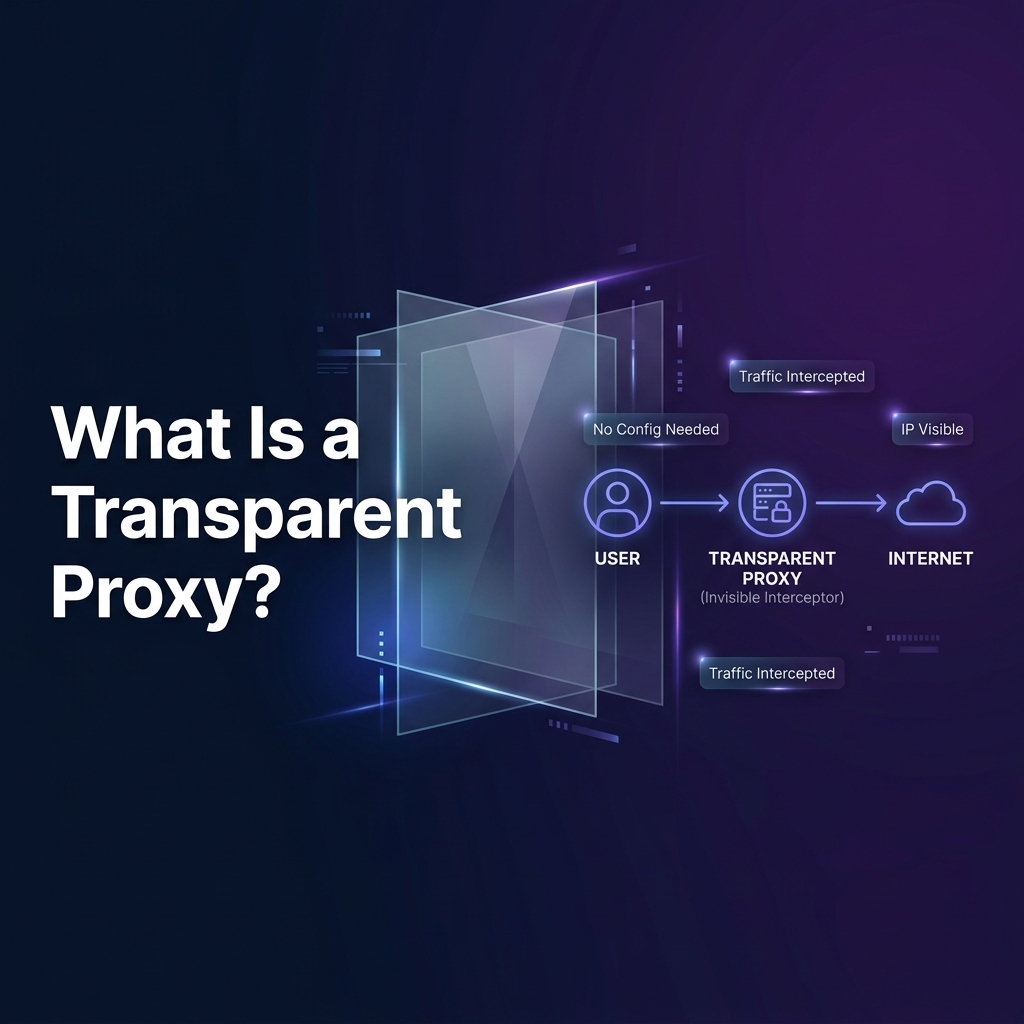
A transparent proxy is a network proxy that intercepts traffic without requiring any configuration on the client device. The client has no knowledge that its traffic is being intercepted — it sends packets normally to the destination, but the network gateway (router, ISP, firewall) silently redirects them to the proxy server using kernel-level packet manipulation. Transparent proxies are deployed by ISPs for bandwidth shaping, by corporations for content filtering and DLP, by schools and hotels for captive portals, and by CDNs as reverse proxy caches. This 3,000-word guide covers the complete technical architecture, Linux tproxy implementation, iptables REDIRECT rules, detection methods, and the privacy implications for users.
What Is a Transparent Proxy?
A transparent proxy (also called an intercepting proxy or inline proxy) is a proxy server positioned on the network path between the client and the internet that captures and processes traffic without any proxy settings configured on the client. From the client's perspective, it is communicating directly with the destination server. In reality, a network device (typically a router, firewall, or dedicated traffic shaper) intercepts the packet using kernel-level network address translation and redirects it to the proxy's listening port.
The word "transparent" in this context means transparent to the client — the client is unaware. It does not mean transparent in the sense of "invisible" or "privacy-preserving." In fact, transparent proxies are quite the opposite: they give the network operator full visibility into client traffic. They contrast directly with anonymous proxies and elite proxies, which are designed to hide the client's identity from the destination server.
Transparent proxies can be categorized by what they do with intercepted traffic:
- Caching transparent proxies — Store and serve cached HTTP responses to reduce bandwidth. Common in ISP networks and enterprise WAN optimization.
- Filtering transparent proxies — Block or restrict access to specific URLs, domains, or content categories. Used in schools, corporate networks, and government censorship infrastructure.
- Inspection transparent proxies — Examine request/response content for DLP, malware scanning, or compliance. Often combined with SSL bumping for HTTPS inspection.
- Accelerating transparent proxies — Modify HTTP headers or compress responses to optimize delivery. Used in CDN edge nodes and WAN optimization appliances.
Figure 1 — Explicit Proxy vs Transparent Proxy: client configuration and packet flow comparison
How Transparent Proxies Work: The Technical Architecture
The transparent proxy architecture relies on network-level packet interception. Traffic interception happens at the gateway level (router or firewall), not at the client. The three main interception mechanisms are:
1. iptables REDIRECT (Most Common on Linux): The gateway runs Linux with iptables configured to REDIRECT incoming packets on port 80 (HTTP) to the local proxy port (e.g., Squid on port 3128). The -j REDIRECT target changes the packet's destination address to the local machine while preserving the original destination address in a kernel data structure, which the proxy can read via SO_ORIGINAL_DST socket option.
2. Linux tproxy (TPROXY target): A more advanced mechanism available in the Linux kernel since 2.6.28, the TPROXY iptables target provides fully transparent proxying without destination NAT. The proxy socket receives packets as if they were destined for the original server's IP and port — allowing the proxy to serve as a real transparent interceptor without modifying destination addresses, which is important for HTTPS transparent proxying via IP spoofing.
3. Policy-Based Routing (PBR) / WCCP: Cisco's Web Cache Communication Protocol (WCCP) allows routers to redirect HTTP traffic to web cache/proxy servers transparently. This is deployed in enterprise environments with Cisco infrastructure. The router and proxy server communicate via WCCP to coordinate which traffic to redirect.
Figure 2 — Linux iptables transparent proxy configuration: REDIRECT and TPROXY methods with Squid
Transparent Proxy and HTTPS: The SSL Bumping Challenge
The most significant technical limitation of transparent proxies is their inability to transparently intercept HTTPS traffic without performing SSL bumping (man-in-the-middle decryption). Since HTTPS encrypts the application-layer content, a plain transparent proxy can only forward the TCP stream — it cannot inspect, filter, or cache HTTPS content.
Organizations that need to inspect HTTPS traffic via transparent proxies deploy SSL bumping (also called SSL inspection, HTTPS inspection, or TLS interception). This requires:
- The organization issues its own private root CA certificate and installs it in all client devices' trusted certificate stores (via Active Directory Group Policy or MDM).
- The transparent proxy intercepts HTTPS connections and presents clients with a dynamically generated certificate signed by the private CA.
- The proxy decrypts the HTTPS traffic, inspects/filters/logs it, then re-encrypts it for forwarding to the real server.
Modern browsers implement certificate transparency (CT) logs and HPKP (deprecated) / Expect-CT to detect illegitimate certificates. However, since the private CA is explicitly trusted in the device's certificate store, CT checks pass and the interception is undetectable at the TLS level. The only clue is typically the certificate issuer changing from "Let's Encrypt" or "DigiCert" to the corporate CA.
Transparent Proxy Real-World Deployments
Transparent proxies are deployed at massive scale across multiple sectors. Understanding where you're likely to encounter one is important for both privacy awareness and engineering:
ISP Level — Bandwidth Management: Major ISPs deploy transparent proxies (often called "traffic shapers" or "deep packet inspection" appliances) to manage network congestion, throttle specific traffic types (video streaming, P2P), implement traffic policing for tiered data plans, and cache popular content to reduce upstream bandwidth costs. Tools like PacketLogic, Sandvine, and Cisco PBR are widely used for this purpose.
Corporate Networks — Content Filtering: Enterprise firewalls (Cisco Umbrella, Zscaler, Fortigate, Palo Alto) deploy transparent proxy capabilities to enforce acceptable use policies, block malware distribution sites, prevent data exfiltration (DLP), and comply with regulatory requirements (HIPAA, PCI-DSS, SOX). Employees connecting to the corporate LAN or VPN have all their traffic inspected transparently.
Hotels, Airports, and Public Wi-Fi: Captive portals — those "click to accept terms" login pages on public Wi-Fi — are implemented via transparent HTTP proxying. All HTTP traffic is intercepted and redirected to the captive portal page until the user authenticates. HTTPS traffic is typically blocked or passed through unrewritten (since the operator usually doesn't install a custom CA on guest devices).
Educational Institutions: Schools and universities use transparent proxies for content filtering (blocking adult content, gambling, social media during school hours) and bandwidth management. Products like Lightspeed Systems, iBoss, and Cisco Umbrella are common in K-12 environments. Students on school networks are transparently proxied for all HTTP traffic and often for HTTPS via MDM-installed CA certificates on school devices.
CDN Reverse Proxies: Cloudflare, Akamai, and Fastly operate as transparent reverse proxies for millions of websites. Visitors' requests are transparently intercepted at the CDN edge node nearest to them, cache hits are served without the origin server seeing the request, and cache misses are forwarded to the origin. The website owner configures DNS to point to the CDN, making this transparent at the network routing level. See our What Is a Reverse Proxy? guide for details on this architecture.
Figure 3 — Transparent Proxy Deployment Sectors: from ISP/CDN scale to hotel captive portals
How to Detect if You're Behind a Transparent Proxy
Detecting transparent proxy presence is important for security researchers, privacy-conscious users, and organizations auditing their network infrastructure. Several reliable detection methods exist:
HTTP Header Inspection: Transparent proxies commonly add HTTP headers that expose their presence. The most common are X-Forwarded-For (containing the client's real IP), Via (containing proxy server identification), and X-Cache or X-Cache-Lookup (Squid cache status headers). Use services like https://httpbin.org/headers or https://whatismyipaddress.com/ to inspect what headers the server receives. If you see Via: 1.1 squid.example.com, you're behind a transparent proxy.
TTL Analysis: Transparent proxies that relay traffic without modifying IP headers will show the proxy's IP TTL, not the destination server's TTL. If the TTL of responses to different destination servers is identical (suggesting a local hop is responding), a transparent proxy may be present.
HTTPS Certificate Issuer Check: For sites with SSL bumping, the HTTPS certificate issuer will be a corporate CA rather than a public CA like Let's Encrypt or DigiCert. In your browser, click the padlock icon and inspect the issuer field — if it shows an internal corporate or ISP CA, your HTTPS traffic is being intercepted and decrypted.
IP Address vs Hostname Response Difference: Access a known server by IP address directly (bypassing DNS) and compare the response to accessing it by hostname. Transparent proxies often operate on hostname-based filtering — direct IP access may bypass the proxy, revealing different response headers or content.
TCP Port Probing: If port 3128 (Squid default) or port 8080 is open on your default gateway IP, a transparent proxy is likely deployed. Use nmap -p 3128,8080 [gateway-ip] to check.
| Detection Method | What to Look For | Reliability | Tool | Works for HTTPS? |
|---|---|---|---|---|
| HTTP Header Inspection | Via, X-Forwarded-For, X-Cache | High (if not stripped) | httpbin.org/headers | ✗ HTTP only |
| Certificate Issuer | Corporate/ISP CA in cert chain | Very High | Browser padlock | ✓ HTTPS only |
| Port Scan Gateway | Ports 3128, 8080 open on GW | Medium | nmap | Indirect indicator |
| TTL Anomaly | Uniform TTL for all servers | Medium | traceroute/ping | Partial |
| IP vs Hostname Access | Different headers via IP vs hostname | Medium | curl -v | ✗ Limited |
Transparent Proxy and Privacy: What Data Is Exposed?
Understanding what information a transparent proxy has access to is critical for both users concerned about privacy and organizations planning their network security architecture:
For HTTP Traffic: A transparent proxy has complete access to all HTTP traffic: full URLs, request headers (including cookies and session tokens), request bodies (form submissions, API payloads), and response bodies. HTTP traffic through a transparent proxy is essentially fully visible to the proxy operator.
For HTTPS Traffic Without SSL Bumping: The transparent proxy sees only: destination IP address, destination hostname (via TLS SNI field in the ClientHello), and traffic volume and timing metadata. The actual content of HTTPS requests and responses is protected by TLS encryption and invisible to the proxy.
For HTTPS Traffic With SSL Bumping: The proxy has full access to all decrypted HTTPS content — identical to HTTP visibility. Users on networks with SSL bumping have no practical privacy for web traffic, including passwords, banking sessions, and personal communications — unless the application uses certificate pinning. This is why enterprise HTTPS inspection policies require explicit user consent and disclosure in most jurisdictions.
For users who want to protect privacy from transparent proxy surveillance, elite proxies and VPNs provide protection since all traffic exits the local network already encrypted in a VPN tunnel that the transparent proxy cannot inspect (without SSL bumping the VPN tunnel itself, which requires additional configuration). See our guide on proxy vs VPN for a full comparison.
Figure 4 — Data Visibility Matrix: What a transparent proxy can see in HTTP vs HTTPS traffic
Transparent Proxy vs Other Proxy Types
To fully understand transparent proxies, it's helpful to position them relative to other proxy categories defined by their anonymity level and configuration model:
Transparent Proxy: No client configuration required. Operated by a network intermediary (ISP, employer, school). Client's real IP is typically forwarded to the destination via X-Forwarded-For. No anonymity provided to the client — the opposite of anonymization. Used for monitoring, filtering, caching, and optimization.
Anonymous Proxy: Client-configured. Hides the client's real IP from the destination server. May add X-Forwarded-For indicating proxy use. Provides anonymization without disclosure. Used for privacy and geo-restriction bypass.
Elite Proxy (High Anonymity): Client-configured. Hides real IP and removes all proxy identification headers. The destination server cannot detect proxy use. Maximum client anonymization.
Forward Proxy: Client-configured. Sits between clients and the internet. Encompasses both transparent and non-transparent proxies depending on configuration. Used for anonymization, content filtering, and caching.
Reverse Proxy: Server-side configuration. Transparent to clients but not to servers — clients connect to the proxy thinking it's the server. Used for load balancing, CDN caching, and DDoS protection.
Frequently Asked Questions About Transparent Proxies
Can a transparent proxy see my HTTPS traffic?
Without SSL bumping: no. A transparent proxy without SSL inspection can only see the destination hostname (from TLS SNI) and traffic volume for HTTPS — the content is encrypted. With SSL bumping and a trusted custom CA installed on your device: yes, your HTTPS traffic can be fully decrypted and inspected. Check the certificate issuer to determine if SSL bumping is active.
Can I bypass a transparent proxy with a VPN?
Yes, in most cases. A VPN encrypts all your traffic before it leaves your device and sends it to the VPN server. The transparent proxy at the gateway level will only see encrypted VPN traffic going to the VPN server's IP — it cannot inspect the content or filter based on destination URLs. Some networks block VPN protocols (UDP/500, UDP/4500, TCP/443 with VPN fingerprinting), but HTTPS VPNs on port 443 are difficult to distinguish from normal HTTPS traffic without deep packet inspection.
Is a transparent proxy legal?
Legality depends on jurisdiction and context. In most countries, ISPs can legally deploy transparent proxies for traffic management and content filtering as long as they disclose this in their terms of service. Employers can legally inspect employee network traffic on company networks, typically with disclosure in acceptable use policies. Government-mandated transparent proxy censorship systems are controversial but legal in many countries. SSL bumping of employee HTTPS traffic generally requires explicit consent or disclosure. Unauthorized interception of others' network traffic is illegal under computer fraud laws in virtually all jurisdictions.
Internal Resources on Proxy Types and Privacy
- What Is an Anonymous Proxy? — Anonymity Levels Explained
- What Is an Elite Proxy? — High Anonymity Proxy Guide
- What Is a Forward Proxy? — Architecture and Use Cases
- What Is a Reverse Proxy? — CDN, Load Balancing & DDoS Protection
- What Is an HTTPS Proxy? — TLS Tunnel Architecture
- Proxy vs VPN: Complete Guide to Privacy Tools
- What Is an HTTP Proxy? — Architecture, Protocols & Security
- Types of Proxy Servers Explained: Complete Technical Guide
- IP Whitelisting for Proxies: How It Works
- Proxy Authentication Methods Explained
Written by PROXYIP
Our editorial team consists of network engineers and data scraping experts dedicated to bringing transparency to the proxy market. We specialize in distributed infrastructure and high-scale data acquisition.