What Is a Transparent Proxy?
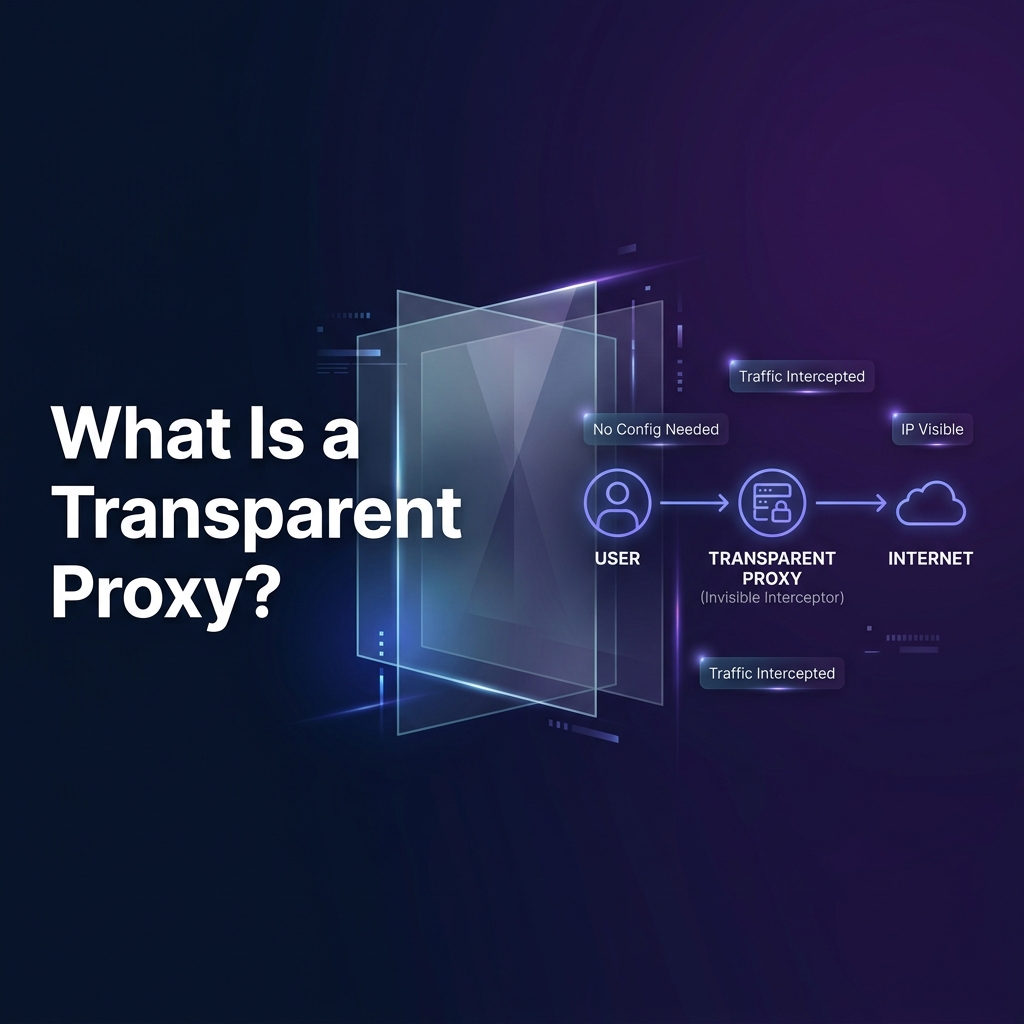
A transparent proxy is a network intermediary that intercepts and forwards traffic without requiring any configuration on the client device. Unlike HTTP proxies or SOCKS5 proxies that require explicit settings in the operating system or application, a transparent proxy operates at the network infrastructure level — typically deployed on a gateway, router, or firewall — where it silently captures all outbound traffic without the end user's knowledge or involvement.
The term "transparent" refers not to privacy, but to configuration transparency: the proxy is invisible to the client's software stack. End users do not set a proxy address or port. Applications do not know they are being proxied. Yet every HTTP or HTTPS packet leaving the network passes through the proxy, where it can be inspected, logged, cached, filtered, or modified before being forwarded to the destination server.
Understanding transparent proxies is essential for network engineers, security practitioners, enterprise IT teams, and developers who need to understand why their traffic behaves unexpectedly on certain networks, how content filtering works in schools and corporate environments, and why their real IP address may still be visible even when they believe they are protected.
What Is a Transparent Proxy? (Technical Definition)
A transparent proxy — also referred to as an inline proxy, intercepting proxy, or forced proxy — is a proxy server that intercepts network connections at the infrastructure level without requiring any client-side configuration. RFC 3040 and subsequent IETF working group documents formally define intercepting proxies as those that "redirect traffic from clients that are not explicitly configured to use a proxy."
Technical Definition: A transparent proxy is a network device or software component deployed inline between client devices and the upstream internet, which intercepts TCP connections (typically on port 80 and 443) at the network layer and processes or forwards them without requiring clients to know the proxy exists or configure any proxy settings.
The critical distinction between transparent and non-transparent proxies lies in the interception mechanism. A standard forward proxy requires the client to explicitly send its HTTP requests to the proxy's socket (IP:port). A transparent proxy instead positions itself at a network chokepoint — a default gateway, a managed switch, or a firewall — where it can capture packets before they leave the local network, regardless of the application or operating system configuration on the client machine.
How a Transparent Proxy Works
The operational mechanics of a transparent proxy involve two distinct layers: the network layer interception (how packets are captured) and the application layer processing (what the proxy does with captured traffic). Understanding both layers clarifies why transparent proxies can intercept traffic without client awareness.
Network Layer: How Packets Are Captured
When a client device sends an HTTP or HTTPS request, it constructs a TCP packet addressed to the destination server's IP and port (80 for HTTP, 443 for HTTPS). Under normal routing, the default gateway simply forwards this packet toward its destination. In a transparent proxy deployment, the gateway or an inline device redirects this packet to the proxy server instead.
The key technical mechanism is that the original destination IP and port are preserved in the packet headers — the proxy uses these to understand where the client intended to send the traffic. The proxy then opens a new connection to the actual destination server on the client's behalf, completing the circuit while inserting itself as the invisible middleman.
Application Layer: What the Proxy Does
Once the transparent proxy has captured the connection, it processes the traffic at Layer 7 (Application Layer), performing one or more of the following operations:
- Content Inspection: The proxy reads HTTP request headers, including the Host header, URL path, User-Agent, and Referer. For HTTPS traffic, this requires SSL inspection (discussed in detail below).
- URL Filtering: The proxy compares requested URLs against a blocklist or allowlist, blocking access to prohibited categories (adult content, malware domains, social media) or logging requests for compliance audit trails.
- Response Caching: Frequently accessed resources (JavaScript files, images, CSS, API responses) are stored locally and served from cache on subsequent requests, reducing bandwidth consumption and improving response times.
- Traffic Logging: All requests are logged with timestamps, source IP addresses, destination URLs, response codes, and data volumes for security monitoring, compliance reporting, or parental control review.
- Bandwidth Control: The proxy can implement Quality of Service (QoS) policies, throttling traffic to specific destinations or for specific users to manage network congestion.
- Malware Scanning: Downloaded files and web content can be scanned against virus and malware signature databases before being delivered to the client.
Traffic Interception Methods: WCCP, Policy Routing, iptables
Three primary technical mechanisms are used to redirect traffic to a transparent proxy server. Each has specific infrastructure requirements, scalability characteristics, and common deployment environments.
1. Web Cache Communication Protocol (WCCP)
WCCP is a Cisco-developed protocol used to redirect web traffic from Cisco routers and switches to proxy or cache servers. The router intercepts HTTP/HTTPS traffic and tunnels it to a designated WCCP service group (typically a cluster of proxy servers). WCCP supports load balancing across multiple proxy nodes and is widely deployed in large enterprise and ISP environments. Squid Proxy and Cisco Content Engine both support WCCP redirection.
2. Policy-Based Routing (PBR)
Policy-Based Routing allows network administrators to define custom routing decisions based on packet attributes rather than purely on destination IP. A PBR rule can specify: "Any packet from the internal network destined for port 80 or 443 should be forwarded to the proxy server at 192.168.1.253 instead of the default gateway." PBR is supported on most enterprise routers and Layer 3 switches and offers fine-grained control over which traffic is intercepted.
3. Linux iptables REDIRECT
For Linux-based gateways and firewall appliances, the most common interception method uses iptables NAT rules with the REDIRECT target. This redirects incoming packets on specific ports to a local process (the proxy daemon). This is the default mechanism for Squid transparent proxy deployments on Linux systems.
# Linux iptables — Transparent Proxy Setup (Squid on port 3129)

# Redirect all HTTP traffic (port 80) to Squid transparent port
iptables -t nat -A PREROUTING -i eth0 -p tcp --dport 80   -j REDIRECT --to-port 3129

# Redirect HTTPS traffic (port 443) for SSL inspection
iptables -t nat -A PREROUTING -i eth0 -p tcp --dport 443   -j REDIRECT --to-port 3130

# Allow the proxy process itself to bypass the redirect
iptables -t nat -A PREROUTING -p tcp --dport 80   -m owner --uid-owner proxy -j ACCEPT

# squid.conf — Enable transparent interception mode
http_port 3129 intercept
https_port 3130 intercept ssl-bump   cert=/etc/squid/ca.pem   key=/etc/squid/ca-key.pem
Transparent vs Anonymous vs Elite Proxies
The terms transparent, anonymous, and elite are used to classify proxies by the level of client identity information they reveal to destination servers. This classification is based on which HTTP headers the proxy includes or strips when forwarding requests.
The fundamental privacy implication is clear: a transparent proxy provides zero anonymity to the client. The destination server sees the client's real IP address in the X-Forwarded-For header, and the Via header explicitly announces that the traffic passed through a proxy. Transparent proxies are deployed for network management and monitoring, not for privacy. If privacy is the goal, an elite proxy or a VPN is the appropriate tool.
Transparent Proxy and SSL/TLS Inspection
The interception of HTTPS traffic by a transparent proxy is one of the most technically complex and privacy-sensitive aspects of transparent proxy deployments. Since HTTPS traffic is end-to-end encrypted, a transparent proxy cannot read the payload of an HTTPS connection without first terminating the TLS session — a process known as SSL inspection, TLS interception, or SSL bumping.
For SSL inspection to work without triggering browser certificate warnings, the organization must install their proxy's Certificate Authority (CA) certificate into the trusted certificate store of every client device. In corporate environments, this is typically done automatically through Windows Group Policy, macOS MDM profiles, or mobile device management platforms. When the CA certificate is installed, the browser accepts the proxy's dynamically-generated certificate as legitimate — even though the proxy is effectively performing a man-in-the-middle interception of every HTTPS session.
On personal or unmanaged devices, SSL inspection by a transparent proxy will typically trigger certificate warnings, as the browser will not trust an unknown CA certificate signing the server's certificate.
Common Use Cases and Deployments
Transparent proxies are deployed across a wide range of environments for distinct purposes. Understanding each deployment context clarifies the motivations and technical configurations involved.
1. Enterprise Content Filtering
Corporate networks are among the most common environments for transparent proxy deployment. Organizations use transparent proxies to enforce acceptable use policies without requiring employees to manually configure proxy settings on their devices. Every HTTP and HTTPS request from any corporate device passes through the proxy, where access to prohibited content categories (gambling, adult content, social media, file-sharing sites) is blocked, and all web activity is logged for security audit and compliance purposes. This enforcement is fully transparent to the user — web browsing proceeds normally for permitted content, with no visible indication that traffic is being intercepted.
2. School and Educational Network Filtering
Educational institutions implement transparent proxies to comply with legislation such as the Children's Internet Protection Act (CIPA) in the United States, which requires schools receiving federal technology funding to implement internet safety measures protecting minors from harmful online content. Transparent proxies allow schools to enforce safe search settings, block inappropriate content, and log student internet activity across all devices on the campus network — including BYOD devices brought by students — without requiring any device-level configuration.
3. ISP Transparent Caching
Internet Service Providers historically deployed transparent caching proxies to reduce backbone bandwidth consumption. When multiple subscribers requested the same popular content (software updates, streaming media, popular websites), the ISP's transparent proxy would serve the cached version from local storage rather than fetching it from the origin server each time, significantly reducing upstream traffic costs. The adoption of HTTPS has substantially reduced the effectiveness of ISP transparent caching, since encrypted content cannot be cached without SSL inspection.
4. Public Wi-Fi Captive Portals
Airport, hotel, and coffee shop Wi-Fi networks use transparent proxies to implement captive portals — the login pages that appear when you first connect to a public Wi-Fi network. Before authentication, the transparent proxy intercepts all HTTP traffic and redirects it to the captive portal login page. After successful authentication, the proxy releases the restriction and allows normal traffic flow. This is why captive portals typically trigger immediately on HTTP requests but may require additional steps for HTTPS connections.
5. Government-Level Internet Censorship
Some national governments implement large-scale transparent proxy infrastructure as part of internet censorship and surveillance systems. At the ISP and internet exchange point (IXP) level, transparent proxies can be used to block access to specific domains, filter content based on keywords, or log internet activity for law enforcement purposes. These systems often combine transparent proxy interception with Deep Packet Inspection (DPI) technology to analyze encrypted traffic metadata.
How to Detect a Transparent Proxy
While transparent proxies are designed to be invisible to end users, several technical methods can reveal their presence. These detection techniques are useful for network engineers diagnosing connectivity issues, security researchers studying network infrastructure, and privacy-conscious users assessing their network environment.
- HTTP Header Inspection: Access a test endpoint that reflects your HTTP headers back to you (such as
https://httpbin.org/headers). If the response includesX-Forwarded-FororViaheaders containing IP addresses that differ from your expected network address, a transparent proxy is present in the path. - SSL Certificate Inspection: Connect to any HTTPS website and examine the TLS certificate chain in your browser. If the issuing Certificate Authority is an internal corporate CA rather than a well-known public CA (DigiCert, Let's Encrypt, Comodo), an SSL-inspecting transparent proxy is intercepting your HTTPS traffic.
- Traceroute Analysis: Run a traceroute to a destination. If there are unexpected intermediate hops that don't match the expected network path — particularly if the same intermediate IP appears for multiple different destination traces — this may indicate a transparent proxy or inline network device.
- MTU Probing: Transparent proxies often alter TCP MSS (Maximum Segment Size) values or modify TCP window sizes when intercepting connections. Probing with packets of varying sizes and observing where fragmentation occurs can reveal inline devices.
- DNS Behavior: Transparent proxies sometimes intercept DNS queries and return modified responses. Comparing DNS results from different resolvers (your network's DNS vs. 8.8.8.8) can reveal DNS-level manipulation, which often accompanies transparent proxy deployments.
# Method 1: Check HTTP headers for proxy fingerprints
curl -s https://httpbin.org/headers | python3 -m json.tool

# Method 2: Check what IP the destination sees
curl -s https://httpbin.org/ip

# Method 3: Inspect TLS certificate chain
openssl s_client -connect google.com:443 -showcerts 2>/dev/null   | grep -A2 "issuer="

# Method 4: Traceroute to check for unexpected hops
traceroute -n google.com

# If X-Forwarded-For contains your real IP → transparent proxy confirmed
# If issuer is unknown CA → SSL-inspecting proxy confirmed
How Transparent Proxies Are Bypassed
Transparent proxies can be bypassed using several techniques, though the effectiveness of each depends on the specific network configuration and what additional filtering or monitoring is deployed alongside the proxy.
Security and Privacy Implications
Transparent proxies introduce a complex set of security and privacy considerations that affect both the organizations deploying them and the individuals whose traffic they intercept.
For Organizations Deploying Transparent Proxies
Security Benefits: Transparent proxies provide real-time visibility into all web traffic leaving the network. This visibility enables detection of malware command-and-control (C2) communications, data exfiltration attempts, unauthorized cloud application usage, and policy violations. When combined with threat intelligence feeds, transparent proxies can automatically block connections to known malicious domains and IP addresses.
SSL Inspection Risks: While SSL inspection dramatically increases visibility, it also introduces the risk of the proxy server becoming a high-value target. A compromised transparent proxy with SSL inspection enabled could expose the decrypted content of every HTTPS session on the network — essentially giving an attacker a complete record of all secure communications. Organizations must apply strict access controls, regular security audits, and robust logging to the proxy infrastructure itself.
Employee Privacy and Legal Compliance: In many jurisdictions, intercepting employee internet traffic — particularly HTTPS traffic — requires explicit disclosure in employment agreements and may be subject to privacy regulations. Organizations in the European Union must carefully evaluate transparent proxy deployments against GDPR requirements, which may necessitate data minimization, retention limits, and worker consultation requirements.
For Individuals on Intercepted Networks
Privacy Implications: Users on networks with transparent proxy interception should be aware that their browsing activity may be logged and accessible to network administrators. For HTTPS traffic with SSL inspection, the content of otherwise-encrypted communications may be visible to the proxy operator. Sensitive activities — banking, healthcare portal access, legal communications — should ideally be conducted over networks where interception is not deployed, or using a trusted VPN that tunnels traffic before it reaches the transparent proxy.
Certificate Trust Risks: When a corporate CA certificate is installed on a device for SSL inspection purposes, that CA has the cryptographic authority to issue trusted certificates for any domain. If the proxy infrastructure is compromised or the CA private key is stolen, an attacker could use it to generate certificates for any website, enabling undetected phishing and man-in-the-middle attacks against that device.
Transparent Proxy vs VPN vs Firewall
Understanding where transparent proxies fit in the broader network security architecture helps clarify when each technology is appropriate.
In practice, enterprise networks often deploy all three technologies in a complementary architecture: a firewall at the network perimeter handles IP and port-level access control, a transparent proxy provides application-layer content filtering and logging for HTTP/HTTPS traffic, and a VPN gateway enables secure remote access for employees connecting from outside the corporate network.
Frequently Asked Questions
What does "transparent" mean in a transparent proxy?
"Transparent" refers to the fact that the proxy is invisible to client applications — no proxy address or port needs to be configured on the client device. It does NOT mean the proxy provides privacy or anonymity. In fact, transparent proxies expose the client's real IP address to destination servers.
Can a transparent proxy intercept HTTPS traffic?
Yes, but only through SSL inspection (SSL bumping), which requires the proxy to terminate the TLS session and re-encrypt traffic to the destination. This requires installing the proxy's CA certificate on client devices. Without SSL inspection, the proxy can only see the destination hostname (via SNI) but not the encrypted payload of HTTPS connections.
Is a transparent proxy the same as a firewall?
No. A firewall operates at Layer 3/4, filtering traffic based on IP addresses, ports, and protocols. A transparent proxy operates at Layer 7 and can inspect, filter, cache, and log the actual content of HTTP/HTTPS requests. They serve complementary roles and are often deployed together in enterprise networks.
How do I know if I'm behind a transparent proxy?
Check your HTTP headers using a tool like https://httpbin.org/headers. If you see X-Forwarded-For or Via headers you didn't set, a transparent proxy is likely present. For HTTPS interception, inspect the TLS certificate issuer in your browser — if it's an internal or unknown CA, SSL inspection is active.
Does a transparent proxy protect my privacy?
No. Transparent proxies provide zero privacy protection. They forward your real IP address to destination servers and may log all your browsing activity. If you need privacy or anonymity, use an elite proxy, a rotating residential proxy, or a trusted VPN service.
What software is used to run a transparent proxy?
The most widely used transparent proxy software includes Squid (open-source, highly configurable), mitmproxy (popular for security research and SSL inspection), pfSense with Squid (combined firewall and proxy appliance), and commercial solutions like Cisco Web Security Appliance, Forcepoint Web Security, and Zscaler Internet Access (cloud-based transparent proxy as a service).
Related Articles
Written by PROXYIP
Our editorial team consists of network engineers and data scraping experts dedicated to bringing transparency to the proxy market. We specialize in distributed infrastructure and high-scale data acquisition.